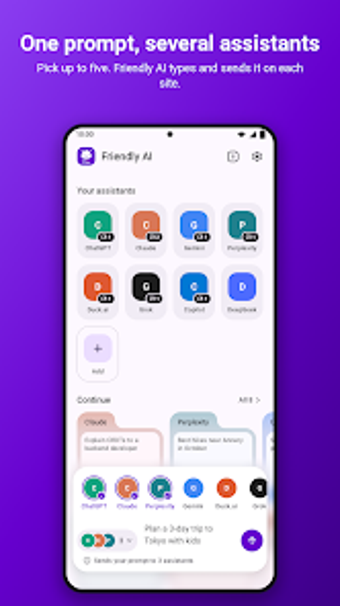
Compare multiple AI assistants side-by-side on Android quickly
Send a single prompt to up to five assistants, view each response in its own tab, and browse dozens of web AI services inside one mobile hub. Friendly AI Browser from Friendly App Studios acts as an Android productivity browser that groups web-based AI tools without creating a separate account. The app packs a curated AI directory, privacy controls, and UI options for reordering and recoloring assistants. It fits researchers, developers, and professionals who regularly compare model outputs across services.
The browser brings multiple web assistants into one mobile workflow
The app consolidates web-hosted AI services by letting users access many assistants from a single interface, so you don't switch between separate apps. Conversations open in tab-based groups, and the composer can send the same prompt to several models at once. The directory lists chat, research, coding, image, and audio services, and you can add any web AI by typing its address into the composer.
Core workflow focuses on comparative prompting and result selection
Side-by-side comparison is the central output pattern: send one question to up to five assistants and then pick the best answer from each tab. That flow supports tasks such as validating research snippets, checking code variations, or sampling creative alternatives. Tabs are grouped by assistant, which keeps multiple simultaneous conversations organised while you copy, annotate, or export selected outputs to other mobile apps.
Interface choices lower friction for power users, with modest onboarding
Customization and tab grouping orient the interface toward experienced users. You can rename, recolour, and reorder assistants and set custom start pages and night mode. The app hides common install banners on supported sites. Because the app assumes you sign in to each assistant's official site, initial setup asks for multiple logins rather than a single unified credential, which suits users who already maintain separate accounts.
Privacy features and compatibility target sensitive workflows
Privacy tools aim to protect browsing and app access: tracker blocking, app locking, and automated cookie-consent rejection are built in. The browser uses the official web interfaces of services, so compatibility depends on those sites; supported assistants listed include ChatGPT, Claude, Gemini, Copilot, and others. Users report the multi-assistant prompting speeds research and creative tasks by comparing outputs without jumping between apps.
Who benefits and who may prefer a simpler setup
Professionals who juggle several web-based AI assistants will find the app a practical hub for comparative work and research. Casual users who prefer a single, account-managed assistant may find the multiple sign-in steps and tab-heavy workflow more demanding. For teams and individual power users comparing model outputs, the browser supports efficient evaluation; those seeking a single-service mobile client should look elsewhere.